> ## Documentation Index
> Fetch the complete documentation index at: https://help.hellofig.io/llms.txt
> Use this file to discover all available pages before exploring further.
# Publishing
> Put your website online for free with a hellofig.app address.
When you're ready, **publish** your website to put it online. Every Fig website can
go live for free at a `hellofig.app` web address — so you can share it with anyone
right away, at no cost.
Fig never publishes without checking with you first. When a site is ready to go
live, Fig asks for your **approval** in the chat — nothing goes public until you
say so.
## Publish your site
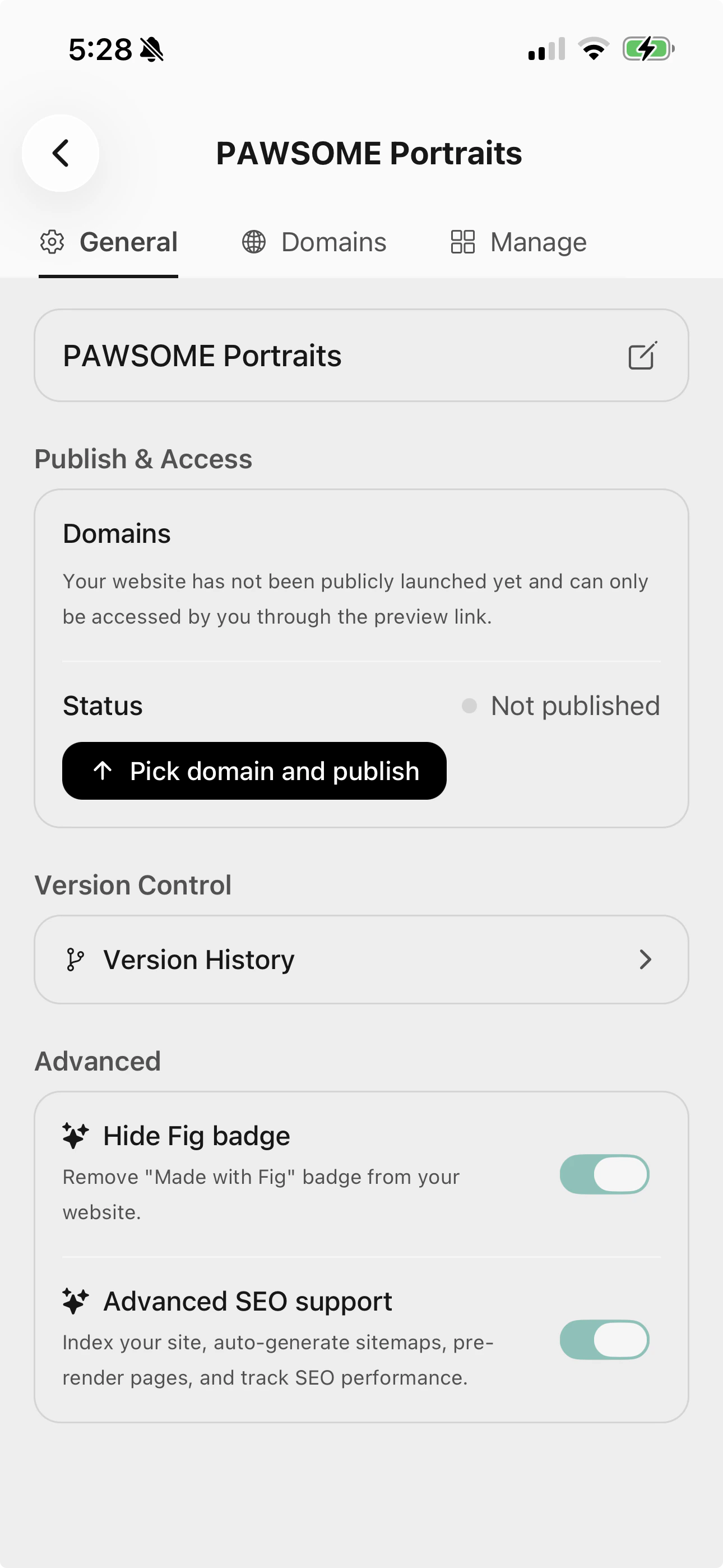
From your website, go to the **General** tab. You'll see its publish status —
a new site starts as **Not published**.
Tap **Pick domain and publish**, choose a free `hellofig.app` address, and
confirm. Fig puts your site online and your address is ready to share.
Publishing happens in the background — Fig sends you a notification the moment
your site is live, so you don't have to wait and watch.
 Changed your mind? You can **unpublish** at any time to take your site offline.
## What's next
Use your own web address, like yourbusiness.com.
SEO, the Fig badge, and version history.
Changed your mind? You can **unpublish** at any time to take your site offline.
## What's next
Use your own web address, like yourbusiness.com.
SEO, the Fig badge, and version history.