> ## Documentation Index
> Fetch the complete documentation index at: https://help.hellofig.io/llms.txt
> Use this file to discover all available pages before exploring further.
# Video editor
> Edit videos in Fig — trim, caption, add voiceover, and export, all without separate software.
Fig includes a full **video editor**, so you can take a video Fig made (or one you
uploaded) and turn it into a finished piece — no separate editing app needed.
The video editor is available in Fig on the web. Open a video from your
[Library](/features/library) or start from one Fig generates for you.
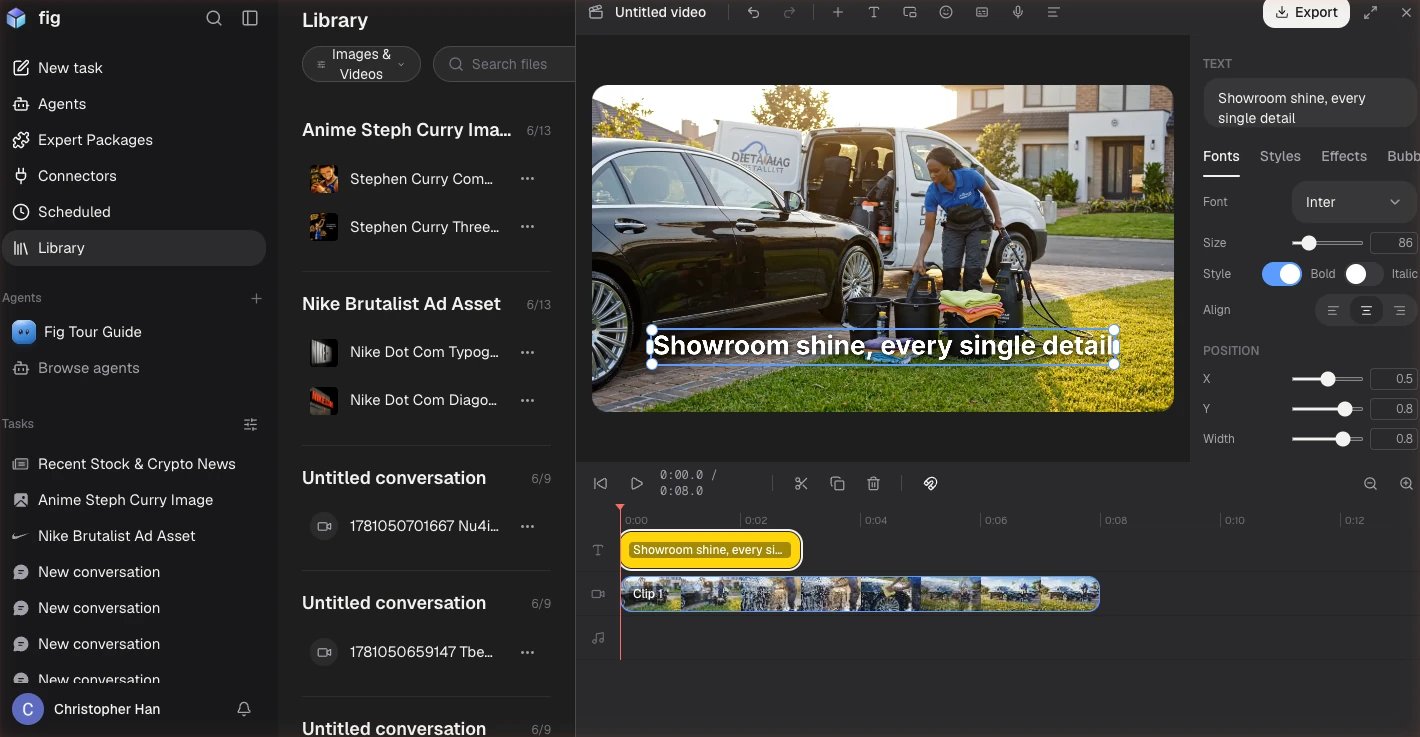 ## What you can do
* **Build a timeline** — combine multiple clips, trim them, and add transitions
between them.
* **Add captions automatically** — Fig listens to your video and generates
captions for you, so it's ready for sound-off viewing.
* **Add a voiceover** — record or generate narration over your video.
* **Layer things on** — picture-in-picture, stickers, and text directly on the
canvas.
* **Clean it up** — remove silent gaps automatically, and fill empty space with a
blurred background.
* **Fine-tune** — keyframes and an audio waveform give you precise control when you
want it.
## Editing by description
You don't have to do it all by hand. Just tell Fig what you want — "cut the first
five seconds," "add captions," "speed up the middle section" — and it makes the
edit for you.
## Exporting
Export your finished video as an **MP4** to share anywhere. You can also export
**captions** as a separate file, or save a short clip as a **GIF**.
Captions make a big difference — most people watch videos without sound at first.
Let Fig auto-caption every video you plan to post.
## What you can do
* **Build a timeline** — combine multiple clips, trim them, and add transitions
between them.
* **Add captions automatically** — Fig listens to your video and generates
captions for you, so it's ready for sound-off viewing.
* **Add a voiceover** — record or generate narration over your video.
* **Layer things on** — picture-in-picture, stickers, and text directly on the
canvas.
* **Clean it up** — remove silent gaps automatically, and fill empty space with a
blurred background.
* **Fine-tune** — keyframes and an audio waveform give you precise control when you
want it.
## Editing by description
You don't have to do it all by hand. Just tell Fig what you want — "cut the first
five seconds," "add captions," "speed up the middle section" — and it makes the
edit for you.
## Exporting
Export your finished video as an **MP4** to share anywhere. You can also export
**captions** as a separate file, or save a short clip as a **GIF**.
Captions make a big difference — most people watch videos without sound at first.
Let Fig auto-caption every video you plan to post.